

Managing Amazon Ads in 2025 requires a sharp understanding of keyword match types. With ongoing Amazon algorithm updates that now give more impressions to Auto & Broad while tightening Exact/Phrase coverage, advertisers need a structured match-type strategy more than ever.
TL;DR (Quick Summary)
- Amazon Ads offers two main targeting approaches: Manual Targeting with three keyword match types (Broad, Phrase, Exact) and Automatic Targeting with four match types (Close Match, Loose Match, Substitutes, Complements)
- Use Automated Targeting for pure discovery, Broad for controlled exploration, Phrase for refinement, and Exact for scaling conversions.
- Use Negative Phrase and Negative Exact to eliminate irrelevant or low-value searches.
- In 2025, Amazon has enhanced these with semantic matching, audience bid boosting, and AI-powered optimization.
- Maintain a layered match-type campaign structure: discovery → refinement → profit.
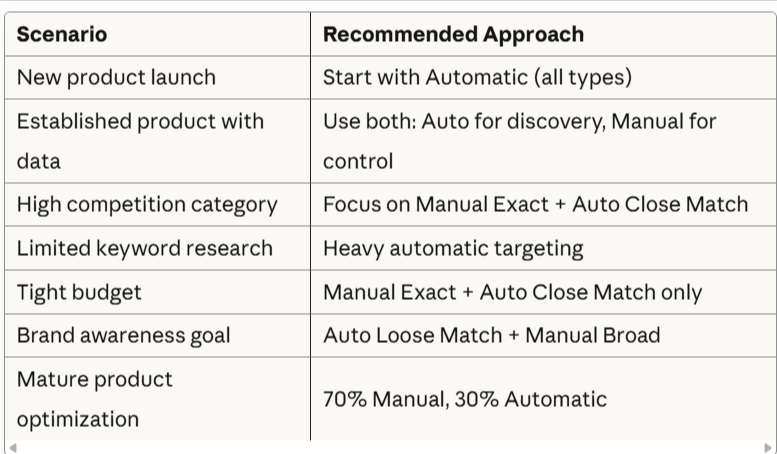
Understanding when and how to use each match type is crucial for controlling ad spend, discovering new keywords, and maximizing ROAS. Most successful advertisers use a combination of automatic targeting for discovery and manual targeting for precision control.
Manual vs. Automatic Targeting: Understanding the Fundamentals
Amazon Ads provides two distinct targeting methods, each approach has unique match types with specific use cases, performance characteristics, and optimization requirements.
Manual Targeting
In manual targeting you choose specific keywords and control which search terms trigger your ads using match types (Broad, Phrase, Exact).
Best for:
- Proven, high-converting keywords
- Precise control over ad spend
- Protecting branded search terms
- Scaling successful campaigns
Automatic Targeting
Amazon’s algorithm automatically matches your ads to relevant searches based on your product information, without requiring keywords.
Best for:
- New product launches
- Keyword discovery
- Finding unexpected high-performers
- Minimal time investment
Critical insight: Most successful Amazon advertisers use BOTH targeting types simultaneously—automatic for continuous discovery and manual for precision control.
Understanding Manual Keyword Match Types
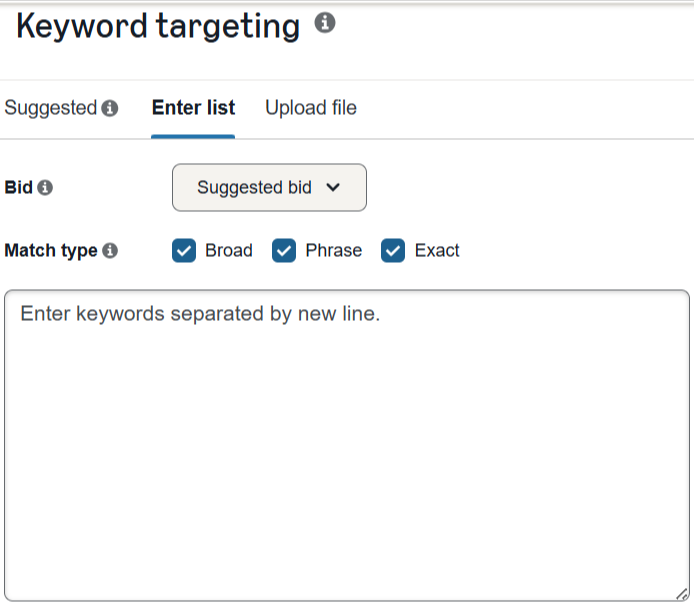
When using manual targeting, you select specific keywords and choose how closely search terms must match your keywords.
The Three Manual Match Types
1. Broad Match
How it works: Broad match is the least restrictive match type, showing your ads for search queries related to your keyword. All keyword terms (or close variations) must be present in the search query, but they can appear in any order and can include additional words.
Important update for 2025: Amazon has made broad match increasingly permissive, similar to Google’s approach. The platform now uses semantic matching, meaning your ad might show for synonyms and related terms even if your exact keyword isn’t present.
Best for:
- Discovering new high-performing keywords
- Reaching a wider audience
- Initial campaign testing
- Products with multiple search variations
Limitations:
- Can generate irrelevant clicks
- Requires frequent monitoring
- Higher potential for wasted spend
- May attract low-intent traffic
2. Phrase Match
How it works: Your keywords must appear in the exact order in the customer’s search query, but additional words can appear before or after the phrase.
2025 Enhancement: Phrase match in Sponsored Brands now uses meaning-based matching. The keyword’s meaning can be implied, and searches may reflect more specific interpretations of that meaning.
Best for:
- Balancing reach and relevance
- Scaling proven keywords
- Targeting specific product categories
- Maintaining control while capturing variations
3. Exact Match
How it works: The most restrictive match type. Your ad only appears when the search query exactly matches your keyword or is a very close variation (primarily plurals and singular forms).
Best for:
- High-intent, proven keywords
- Branded search terms
- Controlling ad spend precisely
- Maximizing conversion rates
- Protecting against competitor bidding
Critical strategy: You should strictly control the ACoS of exact match keywords. These campaigns give you perfect control over ad spend because you know exactly which search terms trigger your ads.
| Match Type | Keyword | Will Match | Won’t Match |
| Broad Match | running shoes | • shoes for running • buy running shoes • running shoe • best running sneakers | • sports shoes • Reebok shoes • walking shoes |
| Phrase Match | “running shoes” | • running shoes in red • Adidas running shoes • discount on running shoes • best running shoes | • shoes for running • running shoe store • shoes running |
| Exact Match | [running shoes] | • running shoes • running shoe | • running shoes for men • blue running shoes • best running shoes |
The Four Automatic Targeting Match Types
As of 2024, Amazon split automatic targeting into four distinct match types, giving advertisers much more control:

1. Close Match
How it works: Shows your ads to shoppers using search terms closely related to your products. This is the tightest form of automatic targeting.
Best for:
- Products with well-optimized listings
- Driving immediate sales
- Lower ACoS campaigns
- Testing automatic targeting
Typical performance: Highest CVR, lowest ACoS, lowest impressions among auto types
2. Loose Match
How it works: Shows your ads to shoppers using search terms loosely related to your products. Broader than Close Match but still connected to your product.
Best for:
- Keyword discovery
- Expanding reach
- Products with diverse use cases
- Building brand awareness
Typical performance: Moderate CVR, higher impressions, moderate ACoS
3. Substitutes
How it works: Shows your ads on product detail pages of products similar to yours (competitor products or alternatives).
Best for:
- Stealing market share from competitors
- Capturing comparison shoppers
- Products with clear alternatives
- Defensive strategies against competitors
Typical performance: Variable CVR, depends on product competitiveness, can have excellent ROAS if your product offers better value
4. Complements
How it works: Shows your ads on product detail pages of products that complement yours (items frequently bought together or that enhance your product).
Best for:
- Cross-selling opportunities
- Accessories and add-ons
- Products used together
- Expanding customer basket size
Typical performance: Lower CVR than Close Match, but can drive incremental sales, moderate ACoS
Optimizing Automatic Targeting
Key optimization strategies:
- Use negative keywords aggressively: Even though Amazon chooses targets, you can exclude irrelevant searches
- Monitor search term reports weekly: Harvest profitable keywords for manual campaigns
- Adjust bids by match type: Don’t use the same bid for all four types
- Separate campaigns by type: After initial testing, split into four campaigns for better control
- Optimize product listings: Auto targeting relies on your listing content—better listings = better targeting
When to Use Automatic vs. Manual Targeting
Match Type Comparison Table
| Feature/ Match Type | Close | Loose | Substitutes | Complements | Exact | Phrase | Broad |
|---|---|---|---|---|---|---|---|
| Control Level | Medium | Low | Medium | Medium | Highest | High | Low |
| Discovery Potential | Medium | High | High | High | None | Low | High |
| Best For | Balanced performance | Finding new terms | Competitive | Cross-sell | Proven keywords | Scaling | Testing |
| Monitoring Required | Medium | High | Medium | Medium | Low | Medium | High |
| Negative Keywords | Yes | Yes | Yes | Yes | Yes | Yes | Yes |
Important Match Type Rules for 2025
What Amazon Does Support:
- Plural variations: “shoe” matches “shoes”
- Singular forms: “shoes” matches “shoe”
- Certain excluded words: Amazon ignores words like “the,” “of,” “when,” “and,” “if”
What Amazon Does NOT Support:
- Misspellings: “vitamns” won’t match “vitamins” (add common misspellings as separate keywords)
- Stemmed words: Different word forms aren’t automatically included
- Abbreviations: Must be added separately
Character Limits:
- Keywords can be up to 80 characters
- No limit on the number of words per keyword for positive keywords
Understanding Negative Keyword Match Types
Negative keywords are essential for preventing your ads from appearing on irrelevant searches, thereby reducing wasted spend and improving campaign efficiency.
Why Negative Keywords Matter
Benefits:
- Reduce wasted ad spend on irrelevant clicks
- Improve campaign ACoS by filtering low-quality traffic
- Increase CTR by showing ads to more relevant audiences
- Prevent keyword cannibalization in manual campaigns
- Filter unwanted traffic in automatic campaigns
- Improve quality score and ad relevance
When to add negative keywords:
- Search terms with spend but zero conversions
- Searches that triggered ads but are clearly irrelevant
- High-click, no-conversion terms
- Informational queries (if selling products)
- Wrong product type, color, size, gender, etc.
Available Negative Match Types
1. Negative Phrase Match
How it works: Prevents your ad from showing for search queries that contain the complete phrase (or close variation) in the same order.
Notation: “keyword phrase” (in quotes)
Character limits:
- Maximum 4 words per negative phrase keyword
- 80 characters total
Use when:
- You want to block an entire concept or phrase
- You’re eliminating search categories
- Blocking brand names across all contexts
- The phrase represents irrelevant intent in any context
| Your Product | Negative Phrase | Blocks |
| Women’s shoes | “men” | men shoes, shoes for men, men running shoes |
| New laptops | “refurbished” | refurbished laptops, buy refurbished laptops |
| Premium products | “cheap” | cheap alternatives, cheap versions, looking for cheap |
2. Negative Exact Match
How it works: Blocks your ad from appearing only when the search query exactly matches your negative keyword or a close variation of it.
Notation: [keyword phrase] (in brackets)
Character limits:
- Maximum 10 words per negative exact keyword
- 80 characters total
Use when:
- You want to block a specific search term only
- You want surgical precision in exclusions
- The term with modifiers might still be relevant
- Testing whether variations perform differently
| Your Product | Negative Exact | Blocks | Still Allows |
| Leather bags | [cheap bags] | cheap bags, cheap bag | cheap leather bags, bags cheap sale |
| Running shoes | [shoes] | shoes, shoe | running shoes, best shoes, buy shoes online |
Negative Match Type Comparison Examples
| Negative Type | Negative Keyword | Won’t Show For | Will Show For |
| Negative Phrase | “carry bag” | • reusable carry bag • carry bag plastic • carry bag for groceries • buy carry bag online | • bag carrier • carrying bags • bag for carrying |
| Negative Phrase | “red shoes” | • red shoes for boys • cheap red shoes • buy red shoes online • best red shoes | • shoes in red • red sneakers • red color shoes • shoes red bottom |
| Negative Exact | [carry bag] | • carry bag • carry bags | • reusable carry bag • carry bag for shopping • plastic carry bags • small carry bag |
| Negative Exact | [red shoes] | • red shoes • red shoe | • red shoes for men • buy red shoes • running red shoes • best red shoes |
Key Difference from Google Ads
Critical distinction: Unlike Google Ads and Microsoft Advertising, Amazon includes close variants (plurals, singulars, slight misspellings) in negative keywords. This means:
- This makes Amazon’s negative keywords more powerful but requires careful consideration
- Adding “refurbish” as negative phrase also blocks “refurbished,” “refurbishes”
- Adding [cheap] as negative exact also blocks [cheap] and [cheep] (misspelling)
Where to Add Negative Keywords
Campaign Level: Negative keywords apply to all ad groups within the campaign. Use this for broad exclusions that apply to your entire product line.
Ad Group Level: Negative keywords apply only to that specific ad group. Use this for more granular control and specific product exclusions.
FAQs
Q: Should I use all three match types for every keyword?
Not necessarily. Start with exact match for your proven, high-converting keywords. Add phrase match to capture variations once you have data showing strong performance. Use broad match selectively for keyword discovery or when testing new products. High-budget advertisers might use all three with proper negative keyword management.
Q: How often should I review and add negative keywords?
Minimum: Weekly for active campaigns with significant spend. Ideal: Daily for high-spend campaigns. Use automation tools or Amazon’s search term reports to identify poor-performing search terms that have spent more than your product’s average order value without generating sales.
Q: Can I use the same keyword in different match types within one campaign?
You can, but it’s not recommended. Amazon will decide which keyword to match with each search query, reducing your control. The match type campaign strategy (separate campaigns for each match type) provides better control and performance tracking.
Q: What’s the difference between a negative phrase match “red shoes” and a negative exact match [red shoes]?
Negative phrase “red shoes” blocks any search containing “red shoes” in that order (e.g., “buy red shoes,” “red shoes sale”). Negative exact [red shoes] only blocks the exact phrase “red shoes” (including plurals), but allows “buy red shoes” or “red shoes sale” to trigger ads.
Q: Do misspellings match in Amazon Ads?
No. Unlike Google Ads, Amazon does not automatically match misspellings. You must add common misspellings as separate keywords. However, negative keywords do include close variants including slight misspellings.
Q: How does semantic matching affect my keyword strategy in 2025?
Semantic matching (primarily in Sponsored Brands) means your ads can show for conceptually related searches even if your exact keyword isn’t present. This increases reach but requires closer monitoring of search term reports. Harvest relevant semantic variations as new keywords and exclude irrelevant ones as negatives.
Q: Should I add my brand name as an exact match keyword?
Yes, absolutely. Even though people searching your brand name likely intended to find you anyway, competitors can bid on your brand terms. Bidding on your own brand in exact match ensures your products appear prominently and prevents competitor ads from displacing you. Brand terms typically have the lowest ACoS and highest conversion rates.
Q: How do I handle negative keywords when using the match type campaign strategy?
Use a cascading negative keyword approach:
- Exact Campaign: No negatives needed
- Phrase Campaign: Add exact match keyword as negative exact
- Broad Campaign: Add exact match keyword as negative exact AND phrase match keyword as negative phrase
Additionally, add irrelevant search terms discovered in search term reports as negatives at the appropriate level (campaign or ad group).
Q: What’s the maximum number of negative keywords I can add?
While Amazon doesn’t publish hard limits for negative keywords, practical limits include:
- 4 words maximum per negative phrase keyword
- 10 words maximum per negative exact keyword
- 80 characters per keyword
For campaign management, focus on quality over quantity—prioritize high-frequency irrelevant terms that consume budget.
Conclusion
Mastering Amazon Ads match types requires understanding both automatic targeting (Close, Loose, Substitutes, Complements) and manual targeting (Exact, Phrase, Broad), plus the strategic use of negative keywords. The match type campaign strategy—creating separate campaigns for each match type with strategic negative keywords—remains one of the most effective ways to control your advertising spend and maximize ROAS.
Key takeaways:
- Use both Auto and Manual: Start with automatic for discovery, graduate winners to manual for control
- Structure is critical: Separate campaigns by match type prevent cannibalization
- Negative keywords are not optional: Essential for both auto and manual campaigns
- Start tight, expand carefully: Begin with Auto Close Match and Manual Exact, then expand
- Monitor and optimize weekly: All match types require active management
By implementing these strategies systematically and monitoring performance closely, you can significantly reduce your ACoS while increasing sales and market share on Amazon.
Need Help? Consider using automation tools like Karooya’s Negative Keywords Tool, which works with both automatic and manual campaigns and is free for accounts spending under $3,000 per month, to streamline your negative keyword management and improve campaign performance.

Stop the wasted ad spend. Get more conversions from the same ad budget.
Our customers save over $16 Million per year on Google and Amazon Ads.