

Communicating with clients can get tricky when ad platforms run into issues. How do experts spot when something’s gone wrong? How do PPCers keep track of ongoing problems, and what tips do they follow to manage them smoothly? These questions and more were explored by host Julie F. Bacchini in this week’s PPCChat session.
Q1: How do you generally find out when a platform has gone sideways, is down or is having some kind of issue? Does it vary by platform?
I’d like to say I have some amazing framework in place that alerts me to issues before the platform does… And I do have some things, but generally, I find out about outages from socials or here or from industry publications like Search Engine Land or Search Engine Roundtable. @NeptuneMoon
I am in platforms AT LEAST once a week across all managed clients, so best case scenario I catch it quick, otherwise, I catch it after a few days, worst case, the client catches it. @Chriskostecki
Outages typically come from personal experience. Things going sideways is either that, LinkedIn, Search Engine Land, or this lovely community here. @revaminkoff
We have scripts and automated alerts in Adalysis, but I often see things on social before those even trigger. We also have recurring tasks for my team to check things like offline conversion tracking to make sure it’s working. @beyondthepaid
I think having eyes on accounts is important and maybe underrated lately too with all the automation happening. @NeptuneMoon
I’ve got a tool that monitors some of the data flow, but it doesn’t pick up everything. Social media fills in the gaps. @Pete_Bowen
I don’t do much paid social anymore, but I know our paid social team has to do more manual monitoring since things like scripts don’t apply there. @beyondthepaid
The platform changing things / going sideways is different than account performance going sideways. @revaminkoff
Yes @revaminkoff I was thinking for this chat more about when something is wrong in the platform, but performance going sideways is also an issue. @NeptuneMoon
Here is a daily looker report that goes out at 11 am to a client, where we support a call center
(today, yesterday, and two days ago) @Chriskostecki
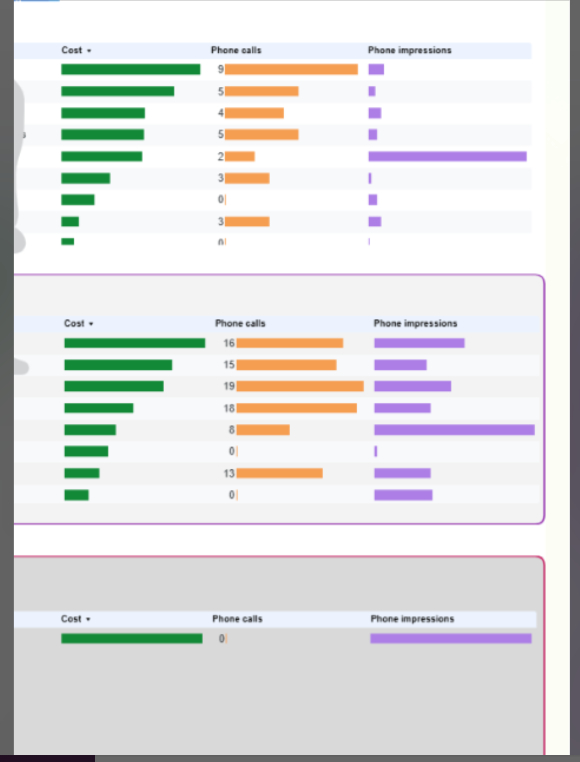
Ah, Looker Studio… the comp sci project that got released as a product. @NeptuneMoon
I find the scripts are less helpful if the platform is making changes versus if there’s an issue with the account in particular. @revaminkoff
I use Power My Analytics to support it and have had some good use out of it – have some handy screaming frog powered crawling reports that are helpful for websites that I manage and it still free (except the 3rd party component) @Chriskostecki
Honestly, nothing beats just going into your accounts at least once a day and looking at the daily numbers to make sure nothing looks off. I do have a dashboard that I look at each day. You can use (free) Looker Studio or something paid like Swido to create a dashboard for your accounts, which does help beyond scripts (no scripts on social platforms or other platforms like Twitch, Spotify, Amazon, etc.) @Ichasse
Part of the problem right now is that with the delays due to consent mode/cookies, sometimes it can take the data a few days to populate. Google has told us up to 72 hours. So that’s making it slower to catch issues imo. Things might not be broken, it might just be a normal expected lag, but you won’t know the difference til the 72 hours elapses and the data either has or hasn’t changed…@revaminkoff
I will add here too – document anything weird you see because you will need it to get refunded if billed for things that you should not have been. @NeptuneMoon
Andrew Lolk had a post a while back where he suggested a quick daily check-in for each platform. Just check clicks/impressions/spend because they aren’t delayed like conversions. I’ve been testing it for about two months. Only takes 10 minutes each morning, and I see any issues within 24 hours. @robert_brady
Q2: When you become aware of a problem within a platform, what are the first things you do? And at what point do you start communicating with clients or stakeholders about what is going on?
Step one is to log into any accounts immediately and see how each is being impacted or not impacted. @NeptuneMoon
First thing I do is investigate. Are our accounts affected? If so, how? How much? Is there a quick fix? @revaminkoff
I will generally get in touch with clients quickly when I am aware of an issue happening, even if I am in the information-gathering stage, so they know I know about it. Nothing worse than having the client let you know about a platform problem! @NeptuneMoon
It depends. If it’s something minor or something that looks like it’s going to stay minor, I won’t do anything. If it looks more serious, I’ll pop out a quick note that says something like “Google’s broken again. I’m on top of it. No action required” @Pete_Bowen
Always try to lead with communication to the client. Since the networks do not pay me a cent, I throw them under the bus at every opportunity. @Chriskostecki
Step 1 is always look to see if you are impacted, and then step 2 is communicate it to your client. I like to look first, so I can give them the issue, but then also provide them with my next steps so they know we have it under control. You could let the client know first, but then you don’t really have any feedback yet on next steps, and I have found if you have what your next steps are, they are much more comfortable with the issue knowing you have it handled. @Ichasse
Agree with the others – first see if you’re impacted. Then communicate: either “this isn’t impacting us” or “we’re investigating/working on a resolution” @beyondthepaid
@Ichasse exactly. I feel much better communicating when there’s a game plan so we’re not just eliciting unnecessary panic. @revaminkoff
Agreed on it being preferable to have some kind of either “this is what we are checking” for all accounts or “this is what we are going to do” for impacted accounts in early communications. @NeptuneMoon
Good judgment from everyone here. Being proactive is always a great way to establish/build trust with clients. @robert_brady
Q3: How do you monitor ongoing issues with a platform and communicate about the status to clients or stakeholders?
Most platforms have some kind of status dashboard you can refresh and check. I will also follow on socials the platforms themselves, so I will see when they post updates on a known issue. And of course, other PPCers I follow here and on socials and LinkedIn.@NeptuneMoon
I then try to balance clients’ feeling informed with telling them too much. This can also vary by client! Some don’t want to know much, only that you are aware and when it is resolved. Others want to be kept in more more detailed loop. @NeptuneMoon
Dashboards and reviewing the data as needed. It is very different if it is an outage vs. if the issue is just some setting or the algo was modified, so the campaigns are showing differently. Sometimes you need to babysit the account pretty closely, and other times you can just make the change and look at it again at the end of the day or even the next day. Every situation is a bit different. Make sure you communicate to the client each time you are checking on the account if there is a change. Much like a nurse/doctor would do for a patient in the hospital being watched. It does 2 things for the client. 1 – It lets them know you are monitoring the account closely, and 2- it lets them know when things are back to normal or working correctly again. @Ichasse
It can help to have a Google doc with some language you use in these kinds of situations, too. That way, you can pull from it and customize in your communications with clients or stakeholders. Things like: We are aware of an issue with [platform] involving [the current thing happening]. We are in the process of reviewing all accounts we manage on this platform to determine if any are being impacted and if so, how they are being impacted. We will update you on the status of your account when we have completed this process. You should expect to hear more from us by [day and time]. @NeptuneMoon
Social media is usually helpful on this kind of stuff. @robert_brady
Being on LinkedIn and in groups like this one makes a big difference in keeping an eye on things. We use DownDetector to monitor for actual outages. @revaminkoff
I’d say I see something on Twitter or here before anywhere else. Sometimes LinkedIn, but that tends to lag Twitter. @NeptuneMoon
Q4: Do you have any tips for navigating outages or other problems with platforms that you’ve learned over the years? Does this vary by platform?
The system status dashboards are the most helpful, better than support often. The platforms are terrible at putting alerts in accounts during active issues, generally too. @NeptuneMoon
I agree @NeptuneMoon, dashboards are the key. If I don’t see something mentioned on social media or some other platform, this is where you usually catch stuff happening to the account out of the ordinary first. The best is having a dashboard that allows connections with all your accounts across different platforms, honestly, but if you have to do it on a shoestring budget, either make a Looker dashboard or just log into your accounts and look at your date windows, but also look at “today” for each day. @Ichasse
I’ve recently implemented a few Google scripts to help keep me on top of things. Auto-emails if accounts aren’t spending by a certain time of the day (likely due to a billing issue), performance data pulled into a Google sheet so I can see all my ad accounts at once, with budget pacing, week-over-week data and yesterday vs. 7-day average. Then I have recurring Asana tasks to check everything. @AnthonyMcDaniel
if its down for everyone, that includes your competitors. hopefully marketing isn’t turning on a dime, and an outage today can be mitigated before it impacts the business. diversify your efforts across networks, so if one goes down (and goes down for users) you will be positioned to receive the influx. Having network apps on your phone to check in on status is handy when you need to get away from your machine. @Chriskostecki
Also, if you need a sanity check, posting something like “is anyone else seeing this” type posts here or on socials can also help you figure out if the weird thing is isolated to your account(s) or more global. @NeptuneMoon
Q5: What do you wish clients or stakeholders understood better about platform outages or problems? Are there things you feel like you have explained a million times that just don’t sink in?
Most clients understand that I have zero control over platforms and how they function. Or changes they decide to make in how they work (but that is a different conversation). I find I say a lot something to the effect of: When we choose to advertise on any platform, we are not in control of most of what happens there. We will diligently manage what we do control and monitor for any system-level issues that could be impacting your account. Beyond that, the best we can do for our clients is to actively monitor accounts and act swiftly when something seems off. @NeptuneMoon
The platforms usually don’t give us a heads up on the changes either! We’re all discovering it for the first time together. Also, we don’t have a lot of (any) power when platforms make changes we don’t like or that are counterintuitive or when they take away a feature we loved, etc. We get you don’t like it. We can try to tell a rep or complain on LinkedIn. Most likely, nothing is going to change, though, so you have to deal with what comes. @revaminkoff
PPCChat Participants
- Julie F Bacchini @NeptuneMoon
- Reva Minkoff @revaminkoff
- Lawrence Chasse @Ichasse
- Anthony McDaniel @AnthonyMcDaniel
- Chris Kostecki @Chriskostecki
- Peter Bowen @Pete_Bowen
- Robert Brady @robert_brady
- Melissa L Mackey @beyondthepaid
Related Links



Stop the wasted ad spend. Get more conversions from the same ad budget.
Our customers save over $16 Million per year on Google and Amazon Ads.