

A lot of PPC work is still the same routine: pull a report, export it, drop it into a spreadsheet, cross-reference it against another export, then actually analyze it. The analysis is the valuable part. Everything before it is friction. That friction is what’s starting to disappear, and the mechanism behind it — Model Context Protocol, or MCP — is worth understanding even if you never touch a line of code.
The shift: asking instead of exporting
MCP works as a translation layer sitting on top of an ad platform’s existing API. Instead of a developer writing code to query the API, or an advertiser exporting data manually, you connect an AI assistant like Claude to the platform’s MCP once, and after that you just describe what you want in plain English. Claude and the MCP handle turning that request into the correct, structured API call behind the scenes — pulling a report, checking a campaign, or in some cases making a change — and hand the result back to you in the conversation.
This matters in PPC specifically because so much of the day-to-day work is repetitive retrieval: search term reports, budget pacing checks, ACoS by campaign, performance comparisons across accounts. None of that requires strategic judgment to get — only to interpret. MCP removes the “get” step.
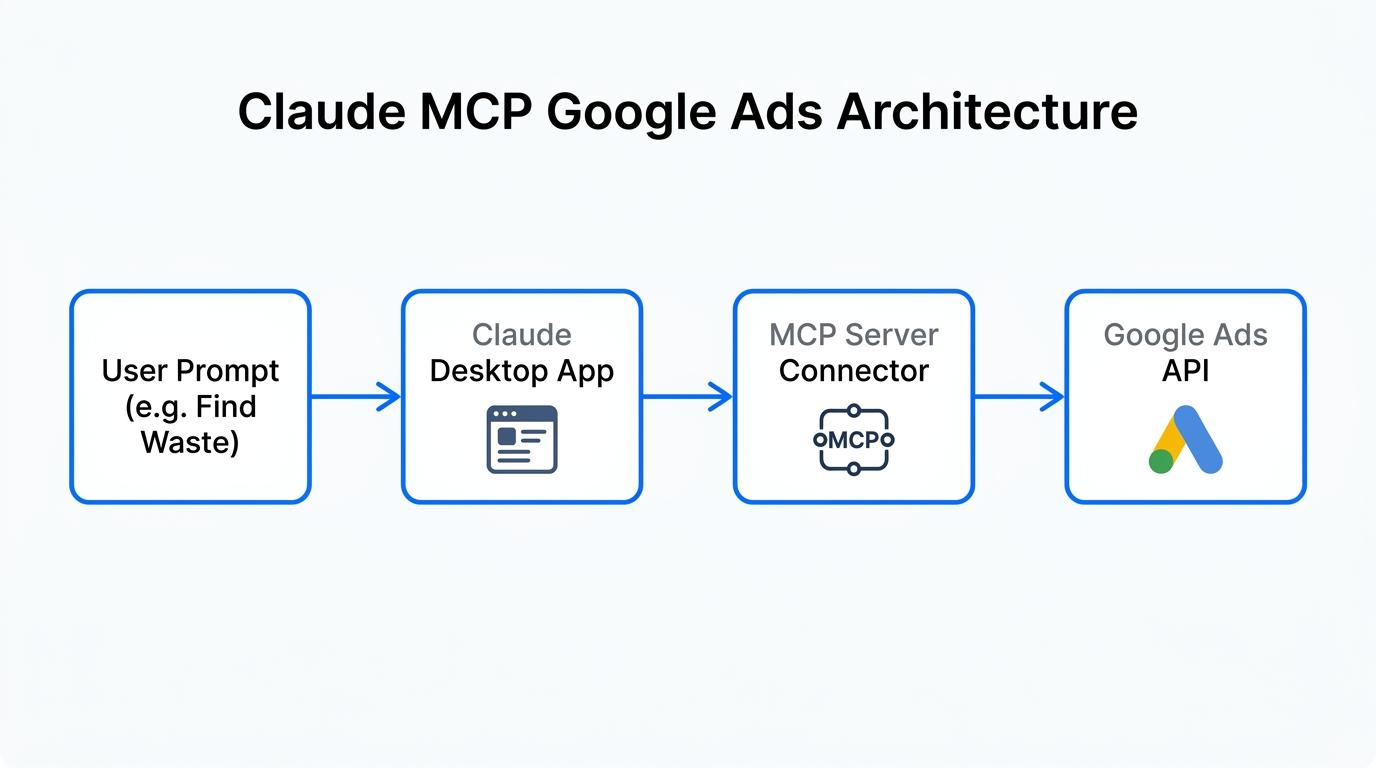
How is this helpful for advertisers?
- No exports, no pivot tables. Ask for a cross-platform comparison — Amazon Sponsored Products vs. Google Search vs. Microsoft Advertising — and get one answer in one conversation, pulled live from each account.
- No API knowledge required. You don’t need to know an endpoint, a report type, or a query syntax. You describe what you want in plain language and the MCP server handles the translation.
- Faster ad-hoc analysis. Search-term mining, negative keyword candidates, budget pacing checks — questions that used to mean downloading a report and building a pivot table now take one sentence.
- Execution, where the platform allows it. On platforms with write-enabled MCP servers (Amazon, Meta, and parts of Microsoft’s), you can move from “show me” to “make this change” in the same conversation — with an approval step in between, if you set one up.
- Consistency across accounts. The same natural-language habit works whether you’re checking Google, Amazon, Microsoft, or Meta — you’re not relearning a different reporting UI for each platform.
Where Google Ads and Amazon Ads stand today
Both platforms have already built their own MCP servers:
- Google Ads has an official MCP server from Google’s Ads Developer team, currently read-only — built for reporting and diagnostics, not for pushing changes into an account.
- Amazon Ads has an official MCP server in open beta with full read/write access — it can pull reports the same way, but can also create or update campaigns and adjust budgets directly.
That asymmetry matters for how you use each one: Google’s connection today is purely an analysis tool, while Amazon’s can move from “show me” to “make this change” in the same conversation.
5 ways to use this in a PPC workflow
1. Cross-platform performance reporting on demand “Compare ROAS on my Amazon Sponsored Products vs. my top 5 Google Search campaigns over the last 30 days.” One request, one synthesized answer, pulled live from both accounts — no exporting, no manual blending.
2. Search-term mining and negative keyword drafting Ask for Amazon’s customer search terms and Google’s search terms report side by side, with overlapping waste flagged — queries burning spend with zero conversions on both — and a draft negative keyword list. What used to mean two exports and a manual VLOOKUP becomes one request.
3. Guardrailed budget and bid adjustments On Amazon, where the MCP supports write actions, ask Claude to identify underperforming campaigns and propose a budget shift, then review and confirm before it executes. On Google, where the MCP is currently read-only, this step stays a recommendation until a person or another tool makes the change.
4. Grounded creative and keyword ideation Rather than generic suggestions, ask the AI assistant to pull your actual top-converting search terms and current ad copy first, then generate keyword expansions or headline variants grounded in what’s already working in the account.
5. Investigating a specific performance question “Why did ad group X’s spend drop yesterday?” the AI assistant can pull dayparting settings, budget pacing, and hourly performance in one conversation to answer a specific question — the way an analyst would, without anyone needing to know which report holds that data.
What this doesn’t replace
MCP closes the gap between asking a question and getting an answer. It doesn’t replace the judgment behind which questions are worth asking, or which of Claude’s proposed changes are actually the right call for the account. Treat it as a faster way to see what’s happening — the strategy still sits with the person running the account.
Where this is headed
MCP support across ad platforms is still early, and a few things are likely to change over the next year or two:
- More platforms, fewer gaps. Microsoft Advertising has already shipped its own MCP server; expect the remaining major ad platforms to follow, closing the cross-channel reporting gaps advertisers currently patch together manually.
- Read-only becoming read-write. Google’s current MCP is diagnostics-only, but Amazon’s open-beta server already shows where this goes — write access, including budget and campaign changes, is likely to become the norm rather than the exception.
- Standardization efforts. Industry initiatives like the Ad Context Protocol (AdCP) are pushing toward a more unified way for AI tools to interact with ad platforms, which could eventually mean less platform-by-platform variation in how these connections work.
- MCP as a layer, not a destination. The more likely long-term shape isn’t “advertisers live inside a chat window” — it’s MCP becoming a standard plumbing layer that purpose-built PPC tools (reporting dashboards, automation platforms, agencies’ internal systems) connect to under the hood, alongside the conversational use case.
FAQs
Do I need to know how to code to use this? No. Connecting to an MCP server is a one-time setup step — authorizing an account, similar to connecting any other app — not a development project.
Is my ad account data safe if I connect it? Connecting authorizes the AI tool to access your account through the platform’s own authentication (OAuth), the same permission model used by other third-party integrations. It’s worth reviewing what access you’re granting and starting with official, platform-run connectors rather than unverified third-party ones.
Can it make changes to my campaigns without my approval? Only if you let it. On platforms with write access, like Amazon’s, it’s worth asking the AI to propose a change and confirm before it executes, rather than granting open-ended automation from the start.
Does this replace analytics tools, dashboards, or automation platforms? Not really — it’s better suited to ad-hoc questions than continuous monitoring. Automated, always-on work (dayparting, portfolio bid rules, ongoing negative keyword harvesting) is still better handled by dedicated tools built to run unattended and keep an audit trail.
Which AI tools support this? MCP is an open standard, so it isn’t limited to one assistant — Claude, ChatGPT, and other MCP-compatible tools can all connect to the same servers.
The bottom line
MCP doesn’t change what’s possible in Google Ads or Amazon Ads — everything it does was already reachable through their APIs. What it changes is who can reach it, and how quickly. For PPC teams, that’s the practical shift worth paying attention to.


Stop the wasted ad spend. Get more conversions from the same ad budget.
Our customers save over $16 Million per year on Google and Amazon Ads.