

Manually adding negative keywords to individual campaigns can be tedious and time-consuming. Negative keyword lists make it easier to group related terms and apply them across multiple campaigns at once. This keeps your account organised, simplifies ongoing management, and makes it easier to update exclusions as search behavior changes.
TL;DR
Discover how to build and manage Google Ads negative keyword lists, find new exclusions using search data and AI, and keep irrelevant traffic out without restricting valuable opportunities.
Why negative keywords still matter in increasingly automated Google Ads?
Negative keywords have always been useful for stopping wasted ad spend, and they remain an important way to prevent ads from showing for clearly irrelevant searches. The role of negative keywords, however, is changing.
Over the years, Google Ads has become increasingly automated. Features such as AI Max for Search and Performance Max use AI to expand reach and identify relevant search queries. AI Max can go beyond traditional keyword matching, using broad match and keywordless technology to discover additional queries.
But automation doesn’t mean advertisers have to give up control. Negative keywords still provide an important way to tell Google which searches are not relevant to your business. If a query may seem related to your keywords but doesn’t align with your offering or goals, you can use a negative keyword to exclude it. This helps prevent irrelevant traffic from consuming budget and keeps campaign targeting aligned with your business objectives.
“While automation handles more of the targeting, negative keywords help advertisers set clear boundaries around unwanted traffic.“
What is a negative keyword list, and why should we use one?
Adding negative keywords manually works well when you need to apply them to just one ad group or campaign. But when the same keywords need to be added across multiple campaigns, ad groups, or the entire account, negative keyword lists make the process much easier and more efficient. Once you update a list, the changes automatically apply to all campaigns or ad groups using that list.
As per 2026 Google Ads updates:
| Negative keywords per list | Up to 5,000 keywords |
| Negative keyword lists per account | Up to 20 shared negative keyword lists |
| Negative keyword lists per campaign | Up to 20 shared negative keyword lists attached to a single campaign |
| Account-level negative | Up to 1,000 account-level negative keywords can be applied across relevant Search and Shopping inventory, including Performance Max |
| Performance Max campaign-level negatives | The limit rose from 100 to 10,000 per campaign in March 2025, and shared lists became usable in Performance Max from August 2025. |
Which negative keyword lists should every Google Ads account have?
Before creating negative keyword lists, segment them by campaign objectives. Keeping your negative keywords organized also makes account management easier. By separating them into relevant lists, you can manage them more efficiently and apply the right exclusions to the right campaigns. Let’s look at the different types of negative keyword lists you can create:
1. Brand Negatives: If you have separate campaigns for brand and non-brand keywords, consider adding your brand terms as negatives to the non-brand campaigns. Brand and non-brand keywords typically perform differently, with brand searches often generating lower CPCs, higher CTRs, and lower CPAs. Keeping brand traffic separate can help prevent overlap between campaigns and give you a clearer view of each campaign’s performance.
2. Competitor Brand Negatives: There are several reasons you may choose not to bid on your competitors’ brand names. You may have an agreement with competitors not to target each other’s brands, or trademark restrictions may limit how you can use their names in your ads or as keywords. In other cases, competitor-related traffic may simply deliver poor conversion rates because users are specifically looking for another brand.
3. Partner Brand Negatives: Your affiliates or business partners may bid on the same terms and compete for the same audience. To avoid your ads appearing for searches that include a partner’s brand name, you can create a negative keyword list containing their brand terms. Similarly, you may want your affiliates to exclude your brand name from their campaigns to avoid competing with your own brand traffic.
4. Product or Audience Negatives: If your campaigns target highly segmented audiences, you may not want users to see ads for products or services that aren’t relevant to them. For example, if you sell kids’ scarves and women’s scarves through separate campaigns, you can add the relevant women’s scarf keywords as negatives in the kids’ scarf campaign, and vice versa. This helps keep your ads aligned with each audience’s needs and prevents irrelevant products from appearing.
5. Related Product Negatives: Overlapping product lines can also lead to irrelevant traffic. For example, if you sell phone chargers, laptop chargers, and power banks, shared terms like “charger” can trigger the wrong ads. Cross-negating specific product terms helps keep each campaign focused.
6. Performance Max Negatives: Negative keyword control in Performance Max has evolved significantly. In 2026, a well-structured setup looks like this:
- Use account-level negatives for exclusions that apply across campaigns
- Use campaign-level negatives or shared lists for campaign-specific exclusions
- Use brand exclusions to block specific brand searches in Performance Max
- Review the Performance Max Search terms report regularly to identify irrelevant queries
Note: Performance Max negative keywords apply to Search and Shopping inventory only, not to Display or YouTube placements.
7. Irrelevant Business Terms: Some search terms may be related to your business but still have the wrong intent. For example, if you sell cakes online, you may not want your ads to show for searches like how to make a cake, cake ingredients, or how to make cake icing. While these searches contain terms related to your business, the intent is different. Since these terms are generally irrelevant to your business, you can add them to a negative keyword list and apply it across relevant campaigns.
8. Generic terms: Words like “jobs,” “careers,” “free,” “salary,” and “login” rarely lead to a sale for most businesses. They are easy to spot and cheap to block, so add them early.
Where can you find new negative keywords?
Now that you know what negative lists you can create, it’s important that you populate the list further. To do this, you can explore:
| Source | How to access | How it helps |
|---|---|---|
| Search term report | Google Ads account>>insight and report>>search terms | It is the best source. You get insight into the actual terms that the user searches for. You could scan this report for any potential keywords or negative keywords. |
| Google keyword planner | Google Ads account>>Tools>>Planning>> Keyword Planner | Helps to identify the right set of keywords that help to reach the relevant target audience |
| Google Search console | Sign in to search console >>your website>>performance>> search results>>queries | Use organic search data to see what people search for. If some searches are irrelevant to your business, consider adding them as negative keywords |
| Google Autocomplete | Can be accessed through Google Search | Enter your keywords into Google Search and check the suggestions. They can give you ideas about what people are searching for |
Apart from these sources, you can also take help of a automation tool. One such tool is Karooya’s Negative Keywords Tool.
For larger accounts, manually reviewing reports and identifying irrelevant keywords can be time-consuming. Karooya’s Negative Keywords Tool simplifies the process by helping you quickly identify keywords that may be irrelevant to your business. With a single click, you can add selected terms as negative keywords, saving time that would otherwise be spent reviewing pages of keyword suggestions.
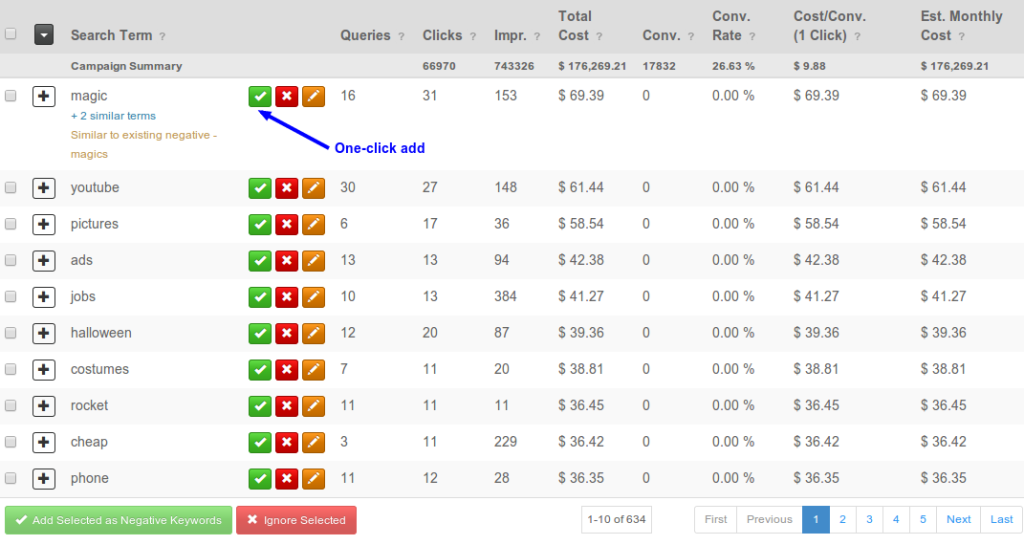
The tool helps identify poor-performing search terms, discover new negative keyword opportunities, and find related terms that may also need to be excluded. You can sign up for the tool here.
What role can AI play in negative keyword research?
Negative keyword research doesn’t have to be completely manual. AI can help advertisers analyse large volumes of search-term data and uncover potential negative keyword opportunities faster. However, rather than letting AI decide what to exclude, use it to find and organise potential negatives that you can review before adding them to your campaigns.
We recently wrote an article highlighting an oriented approach to using AI for negative keyword research. The central idea is:
AI should help accelerate negative keyword research, but it should not make the final exclusion decisions.
The article describes several ways AI can be used, but it also strongly emphasises human review. This is how we can define the workflow in short:
Set boundaries—-> Feed real data to AI—-> Let AI identify keywords —-> Check against conversion data —-> Human reviews —->Monitor and refine
How can you better manage negative keyword lists?
So far, we’ve covered why negative keyword lists are important and the types of lists you can create for a Google Ads account. But how you organise and maintain these lists can have a significant impact on campaign management. Here are some best practices to help you keep your strategy organised while avoiding the risk of blocking valuable traffic.
1. Examine conflicts before adding the negative keyword: Do not add a negative keyword before checking. You do not want to block a search intent you wish to target. Review the new addition carefully.
2. Organise the list by purpose: Keeping negative keyword lists separate keeps your account organised and makes it easier to find the right list for each campaign. It also makes it easier to add or remove keywords when needed.
3. Apply the right negative lists before campaign launch: Assign the right negative keyword list to each new campaign. The wrong list can block valuable searches and potential customers. Using the right list helps filter unwanted traffic while reaching more qualified leads and customers. Our post can shed more light on the best practices to make sure that your negative keyword task is a success.
4. Avoid duplicates: Avoid adding the same negative keyword in multiple places when an existing list already covers it. Keeping your exclusions organised makes account audits much simpler.
Note: As Google already catches misspellings and plurals, you can spend that time on new exclusions.
Final Thoughts
As Google Ads becomes increasingly AI-driven, advertisers may have less manual control over targeting—but that doesn’t mean they have to give up control completely. A well-organised negative keyword strategy can help set clear boundaries around irrelevant traffic. Group your negatives by purpose, apply them selectively, and review them regularly.
If managing large volumes of search-term data manually becomes time-consuming, automation tools such as Karooya’s Negative Keywords Tool can help identify irrelevant search terms, potential negative keyword opportunities, and poor-performing terms for further review.
Related Links


Stop the wasted ad spend. Get more conversions from the same ad budget.
Our customers save over $16 Million per year on Google and Amazon Ads.