

To optimise your PPC efforts, it’s crucial to review and update your Negative keywords regularly. One effective way to identify new negative keywords is by analysing the Google Ads Search Terms Report.
TL;DR
Negative keywords help your Google Ads campaigns show for more relevant searches. By blocking unwanted search terms, you can reduce wasted spend, improve ad performance, and attract more qualified clicks. Regularly checking your Search Terms Report helps you find and add new negative keywords over time.
- Stop ads from showing for irrelevant searches
- Reduce wasted ad spend
- Improve clicks and conversions
- Use the Search Terms Report to find negative keywords
- Update your negative keyword lists regularly
What Are Negative Keywords in Google Ads?
A key part of keyword optimisation in online advertising is the use of negative keywords.
In simple terms:
Negative keywords are specific words or phrases that prevent your ads from appearing in irrelevant searches.
By adding negative keywords and choosing the right match types, advertisers can control where their ads appear, improve targeting accuracy, increase click-through rates, and reduce wasted ad spend.
Why Negative Keywords Matter for Campaign Performance?
Paid search campaigns are a powerful way to reach the right audience, but strong performance depends on targeting the right searches. That’s where negative keywords play an important role. They don’t just keep the “wrong” audience out; they ensure that the campaign remains high-quality and profitable.
For instance, if you are the seller of “designer handbags“, you would want to add “free, cheap, discount, and used” as negative keywords so you won’t be paying for clicks from people who aren’t your target audience.
Here is why they are important for good campaign performance:
| Why negative keywords matter | Explanation | Result |
|---|---|---|
| High relevance + improved CTR gives a high quality score. High quality score can inturn lower CPC and improve ad position | If your ad shows up for irrelevant searches, people may ignore it, which can hurt your CTR. Filtering out irrelevant traffic helps your ads reach people who are actually interested in your offer. | Your ads become more relevant to the searches they actually appear for, which naturally helps improve your CTR. |
| Reduced wasted ad spend | Every irrelevant click is a direct hit to your wallet | Relocate your budget towards those keywords which actually convert |
| Improve quality score | If your ad shows up for irrelevant searches and people ignore it, Google may see your ad as low quality. | People clicking on irrelevant searches can lower your conversion rate |
| Boost conversion rate | People clicking on irrelevent searches can lower your conversion rate | Negative keywords act as a filter. They help you move away from researchers and get you close to buyers |
Types of Negative Keywords: Broad, Phrase, and Exact Match
Understanding match types helps you know when and how to use each one effectively. Using the wrong match type can either let unwanted traffic slip through or accidentally block your best customers. Let’s see how and when to use these negative match types:
| Negtive Match Type | Explanation | Example |
|---|---|---|
| Broad match | It is a default one. No matter what the order is, your ad will not show if the search query contains all the negative words | If your negative broad match is trekking shoes, searches like leather trekking shoes and trekking shoes brown will block your ad |
| Phrase Match | The keyword has to be in quotation marks (“……”). Your ad won’t show if the search query includes the exact keyword phrase in the same order, even with extra words before or after it. | If your negative phrase match is “trekking shoes“, your ad will be blocked for “black trekking shoes” and “trekking shoes for men“ |
| Exact Match | The keyword has to be in brackets [….]. Your ads will not show if the search query includes the exact keyword in the exact order | If your negative exact match is [trekking shoes], your ad will be blocked for [trekking shoes] |
How to Find Negative Keywords in Search Term Reports?
Search terms, also known as search queries, are the terms users enter into a search engine, such as Google. These are the terms that a marketer bids on when running a PPC campaign or uses to build content on their website to drive organic traffic.
Now, how does an advertiser find the terms that a user entered in the search engine? Google Ads lets you review these search terms that users entered before viewing your ad and visiting your website. This report is called the search terms report or search query report. It helps you improve your keyword targeting to reach a more relevant audience.
To find negative keywords in a search term report:
1. Log in to your Google Ads account. Go to the campaign or ad group you want to know the search terms for
2. Go to insight and reports and click on search terms
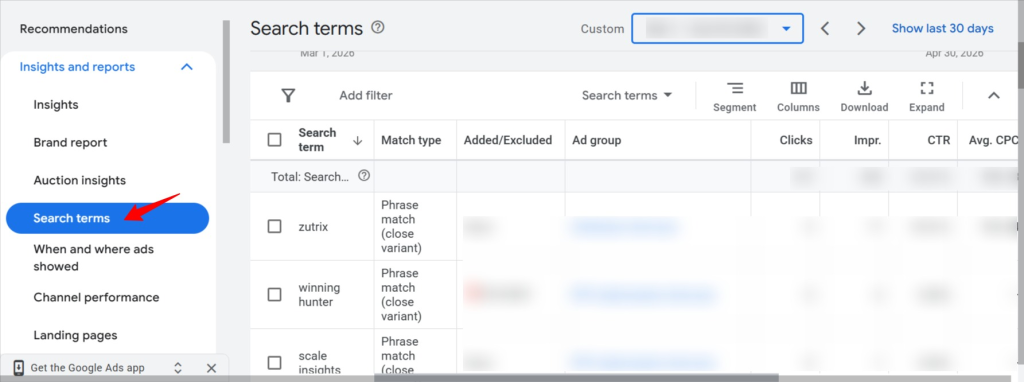
3. Review queries with high spend but low conversions. Check the box next to the irrelevant search term and add it as a negative keyword.
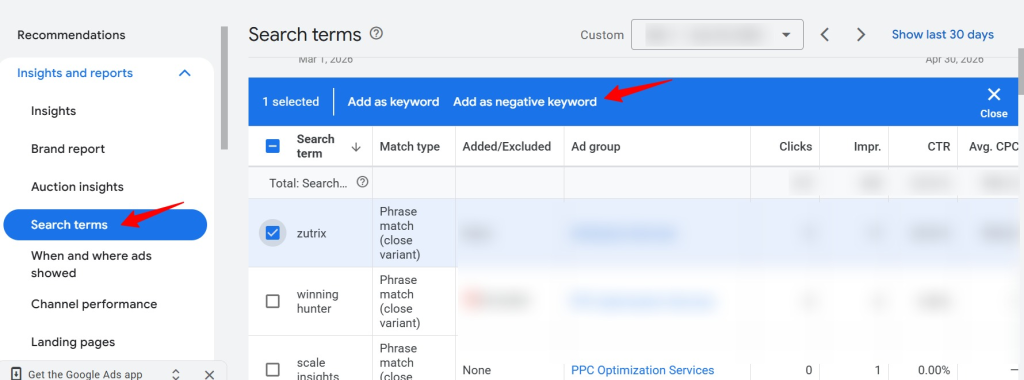
Look for search terms that:
- Do not match with your product offering
- Do not have buying intent
- Attracting the wrong audience
- Consistently underperforming
Add these terms as negative keywords to improve campaign quality over time.
How about focusing on competitor-related search queries??
Sometimes, your ads may appear for searches related to competitor brands, unrelated products or services, or keywords that don’t align with your business goals. While these searches can drive more traffic, they often result in lower conversion rates and wasted ad spend.
If you’re selling “formal men’s shoes,” it’s important to block irrelevant search terms so your ads reach the right audience and drive higher conversion rates.
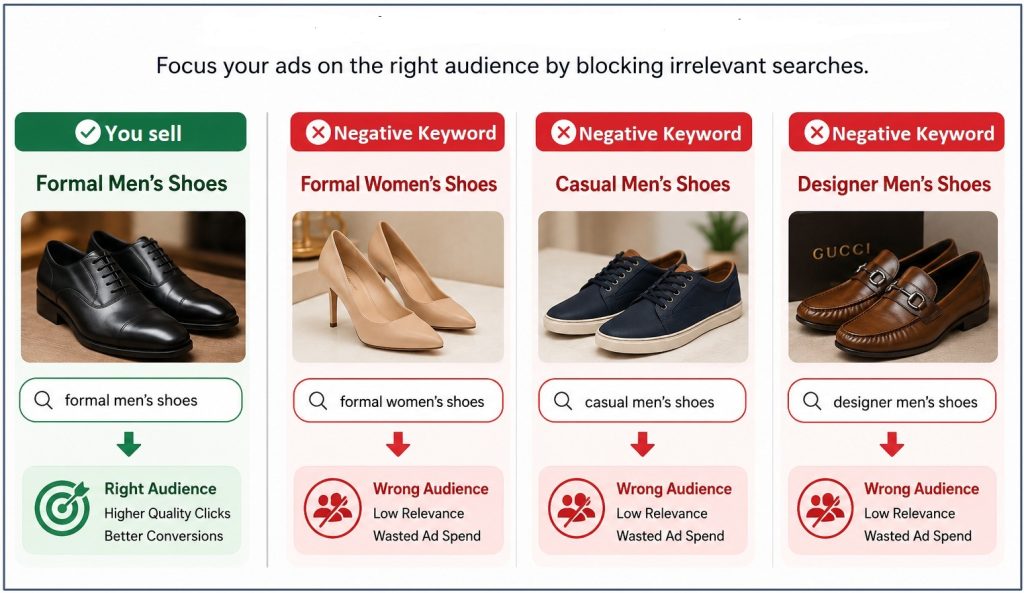
When bidding on competitor keywords, your ads can sometimes appear for unrelated searches. They may also show up for businesses with names similar to yours, even if they offer completely different products or services. That’s why it’s important to use competitor and irrelevant search queries strategically to build a strong negative keyword list.
So, instead of waiting to look into the search term report, brainstorm the keywords in advance so you can save your precious budget. Two points you can focus on:
- Search your target keyword on Google and review the organic results. Check whether any unrelated products or services with names similar to your brand appear in the results. If they do, add those terms as negative keywords to avoid irrelevant traffic.
- Make a list of 5–10 competitors in your industry. Consider whether their brand names could impact your visibility on Google, and if you’d want to exclude them from your campaigns.
A Tip: It will be a plus to create a dedicated “Competitor Negatives” list in your Google Ads Shared Library. This lets you apply the list across all current and future campaigns in just one click, instead of manually copying and pasting the same negative keywords into every new ad group.
What Best Practices Help Maintain Negative Keyword Lists?
Managing a negative keyword list has changed in today’s automated advertising world. As search engines rely more on AI-driven matching, ads are more likely to show for related themes and searches. That’s why regular checks are important to keep negative keyword lists updated and effective.
Review the search term report regularly
The search terms report helps identify both relevant and irrelevant queries, making it easier to improve CTR and overall ad performance. It also helps manage budgets more efficiently by reducing wasted impressions and clicks from irrelevant searches.
However, search behaviour can change over time, so it’s important to review the report regularly to prevent your ads from appearing alongside irrelevant or low-performing search queries. Here are four ideas that can help you use your search term report wisely.
Use shared negative keyword lists
Manually adding negative keywords to individual ad groups or campaigns can be time-consuming, especially for common terms like “free,” “cheap,” “discount,” or “jobs.” A better approach is to create shared negative keyword lists in your account’s Shared Library and organise them by theme. This makes it easy to apply updates across multiple campaigns instantly.
Interestingly, Google Ads allows advertisers to add up to 5,000 negative keywords per shared list and create up to 20 shared negative keyword lists per account. However, deciding how to organise and finalise these lists can often be challenging. A few practical ways can help to identify and group common negative keywords effectively.
Keep updating the list
Negative keyword management is not a one-time task. Regular updates help campaigns keep up with changing search trends, seasonal searches, and customer behaviour. Taking a proactive approach to maintaining negative keyword lists can improve targeting accuracy, reduce wasted ad spend, and drive better overall campaign ROI.
Take help from the Negative Keyword Tool
Automating and simplifying the process of identifying irrelevant search queries is essential for saving time and reducing manual effort. Karooya’s Negative Keywords Tool helps to do the same. This tool acts like a data-mining assistant to uncover negative keyword opportunities faster. This negative keywords tool has several key automated features which can help to maintain the negative keyword list:
- n-gram analysis to detect poorly performing search queries
- single and multi-word negative keyword recommendation
- identifying close variants of irrelevant searches
- monitoring search term performance regularly
- applying negative keywords directly to campaigns and ad groups
Use match types strategically
To maintain traffic quality without blocking valuable searches, choosing the right negative keyword match type is essential. Using match types strategically allows you to control how broadly or narrowly your exclusions apply. A balanced approach improves targeting precision while preserving valuable reach.
Monitor performance
Whether you manage negative keywords manually or with tools like Karooya, regularly monitoring their performance ensures they block irrelevant searches without suffocating the healthy traffic. Look for these metrics to know if your negative keyword strategy is working well:
- Click-through rate (CTR) is going up
- CPC goes down
- Improved conversion rate
Regular monitoring allows advertisers to fine-tune their negative keyword lists, reach the right audience more effectively, and improve overall campaign performance over time.
Final Thoughts
In Google Ads optimisation, negative keywords are one of the most powerful tools for improving targeting, increasing conversions, and reducing wasted spend. By filtering out irrelevant searches, they help ensure your budget is focused on queries that are more likely to convert. A well-managed negative keyword strategy not only improves campaign performance but also supports smarter, more efficient advertising decisions.
Related Links



Stop the wasted ad spend. Get more conversions from the same ad budget.
Our customers save over $16 Million per year on Google and Amazon Ads.